
Introduction to pandas
Last updated on 2026-10-19 | Edit this page
Overview
Questions
- How can I work with tabular data in Python?
- How much did a university pay on average for article processing charges?
Objectives
- Import a library and use its functions.
- Download a CSV file and read it into a pandas DataFrame.
- Inspect, select and filter data in a DataFrame.
- Calculate simple statistics and plot a column.
Libraries
Once we have mastered the core language of Python, there are many libraries (i.e. collections of reusable code) that offer additional functionality. Some come with Python itself (the standard library), others are written and shared by the community. One very popular example is pandas, which was written to work with tabular data.
Every good library should have good documentation. The pandas getting started guide answers questions such as:
- What kind of data does pandas handle? pandas works with so-called DataFrames. The concept comes from the R programming language, and a DataFrame is simply a table consisting of columns and rows. The rows are labelled by an index.
- How do I read and write tabular data? pandas can read many file formats such as CSV (comma-separated values), TSV (tab-separated values) and XLSX (Excel files), as long as the data is tabular.
We can then filter the DataFrame, calculate new values from its columns, plot the data, and finally save the result in the format we need (e.g. CSV, Excel, JSON or HTML).
The data: article processing charges
APC stands for Article Processing Charges, the fees that publishers charge for publishing an article open access. OpenAPC openly collects data on how much institutions pay for APCs. The data is published in the GitHub repository https://github.com/OpenAPC/openapc-de.
In the data folder of that repository there is a folder
for each institution. We will look at the data from FU Berlin for the
year 2015: APC_FU_Berlin_2015.csv.
GitHub renders the CSV file as a nicely formatted table with columns such as institution, period, price in euros, DOI, publisher and journal title. If we click on Raw, we can see the file as it really is: plain text, with commas separating the values and the column names in the first row.
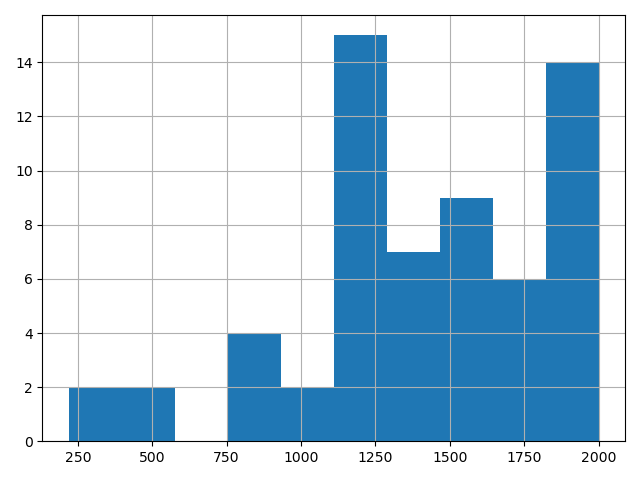
Today we want to find out how much FU Berlin paid on average for APCs, and how the prices are distributed.
Download and read the data
We import two libraries: urllib.request from the
standard library to download files, and pandas, which is by convention
imported under the short name pd.
PYTHON
# Set the source URL
url = "https://raw.githubusercontent.com/OpenAPC/openapc-de/master/data/fuberlin/APC_FU_Berlin_2015.csv"
apc_file = "openapc.csv"The file openapc.csv should now appear in the JupyterLab
file browser. Next, we read it into a DataFrame with
pd.read_csv():
Inspect the DataFrame
If the last line of a cell is a DataFrame, Jupyter displays it as a
nicely formatted table. For long tables, only the first and last rows
are shown. Use .head() to look at the first five rows:
OUTPUT
  institution  period     euro  ...  ut  url  doaj
0   FU Berlin    2015  2000.00  ... NaN  NaN  True
1   FU Berlin    2015  1503.12  ... NaN  NaN  True
2   FU Berlin    2015  2000.00  ... NaN  NaN  True
3   FU Berlin    2015  2000.00  ... NaN  NaN  True
4   FU Berlin    2015  1805.00  ... NaN  NaN  True

[5 rows x 17 columns]
PYTHON
# Change the maximum number of rows displayed to 100
pd.set_option("display.max_rows", 100)
apcsOUTPUT
(61, 17)OUTPUT
Index(['institution', 'period', 'euro', 'doi', 'is_hybrid', 'publisher',
       'journal_full_title', 'issn', 'issn_print', 'issn_electronic',
       'license_ref', 'indexed_in_crossref', 'pmid', 'pmcid', 'ut', 'url',
       'doaj'],
      dtype='object')
Select columns and calculate statistics
A single column is selected with square brackets and the column name. The result is a pandas Series.
OUTPUT
0     2000.00
1     1503.12
2     2000.00
3     2000.00
4     1805.00
       ...
56    1731.45
57    1600.00
58     219.84
59    1386.35
60    2000.00
Name: euro, Length: 61, dtype: float64
A Series has methods to calculate statistics:
OUTPUT
np.float64(2000.0)OUTPUT
np.float64(219.84)OUTPUT
np.float64(1419.6080327868851)OUTPUT
np.float64(1410.07)
apcs.euro
vs. apcs["euro"]
You can also access a column as an attribute,
e.g. apcs.euro. This is less safe, as it fails if the
column name contains spaces or has the same name as a DataFrame method.
In general, spaces in column names should be avoided.
Filter rows
Comparing a column with a value returns a Series of True
and False values, one for each row:
OUTPUT
0      True
1     False
2      True
3      True
4     False
      ...
Name: euro, dtype: bool
We can use this Series inside square brackets to keep only the rows
where the value is True:
To display several columns, pass a list of column names:
OUTPUT
                           publisher                  journal_full_title     euro
0                    Springer Nature             npj Quantum Information  2000.00
1    American Physical Society (APS)                   Physical Review X  1503.12
2                    Springer Nature               Nature Communications  2000.00
3   Public Library of Science (PLoS)                      PLOS Pathogens  2000.00
4                    Springer Nature                       Gut Pathogens  1805.00
...Filtering data
- Filter all rows in which the
"euro"value is above the average. - Show only the
"journal_full_title","euro"and"publisher"columns for these entries.
PYTHON
average_apc = apcs["euro"].mean()                 # Calculate average
over_average_apcs = apcs[apcs["euro"] > average_apc]  # Apply filter
over_average_apcs[["journal_full_title", "euro", "publisher"]]
OUTPUT
        journal_full_title     euro                         publisher
0  npj Quantum Information  2000.00                   Springer Nature
1        Physical Review X  1503.12   American Physical Society (APS)
2    Nature Communications  2000.00                   Springer Nature
3           PLOS Pathogens  2000.00  Public Library of Science (PLoS)
4            Gut Pathogens  1805.00                   Springer Nature
...
30 of the 61 articles cost more than the average.
Plot the data
pandas can plot data directly (using the matplotlib library in the background). A histogram shows how often APCs in a certain price range occur:
PYTHON
# Change the number of bins and the colour
apcs["euro"].hist(bins=20, color="black")  # bins = number of equal parts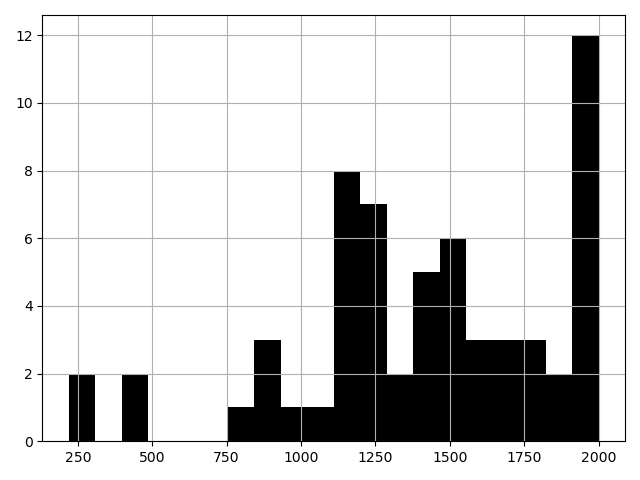
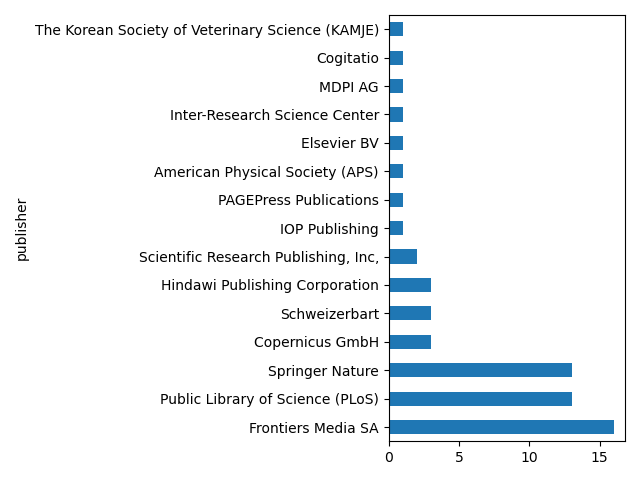
value_counts() counts how often each value occurs in a
column:
OUTPUT
publisher
Frontiers Media SA                                  16
Public Library of Science (PLoS)                    13
Springer Nature                                     13
Copernicus GmbH                                      3
Schweizerbart                                        3
Hindawi Publishing Corporation                       3
Scientific Research Publishing, Inc,                 2
IOP Publishing                                       1
PAGEPress Publications                               1
American Physical Society (APS)                      1
Elsevier BV                                          1
Inter-Research Science Center                        1
MDPI AG                                              1
Cogitatio                                            1
The Korean Society of Veterinary Science (KAMJE)     1
Name: count, dtype: int64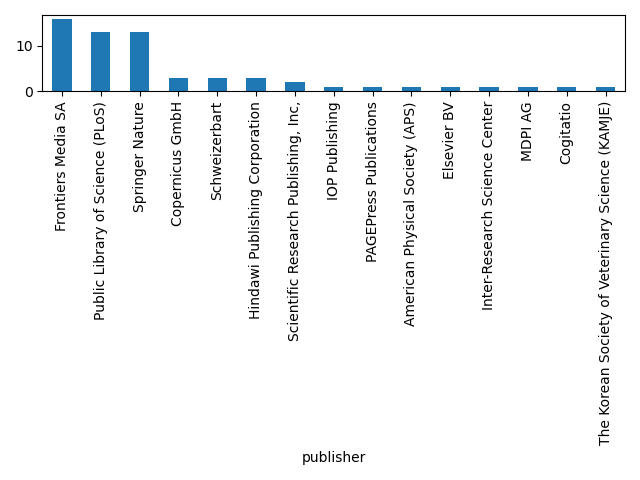
Save the result
Use the method .to_csv() to save
over_average_apcs from the exercise above to a file called
expensive_apcs.csv. Check in the JupyterLab file browser
that the file was created.
Further reading
- pandas official documentation
- 10 Minutes to pandas
- Python Data Science Handbook by Jake VanderPlas
- Software Carpentry: Plotting and Programming in Python
- Use
import library as aliasto load a library. -
pd.read_csv()reads a CSV file into a DataFrame. - Use
.head(),.shapeand.columnsto get an overview of a DataFrame. -
df["column"]selects a column,df[["col1", "col2"]]several columns. -
df[condition]keeps only the rows where the condition isTrue. - Series have methods for statistics (
.mean(),.median(), …) and plotting (.hist(),.plot.bar(), …).